Each feature below says how far it has been tested. That line is taken from the project's own status page.
BASE
Your machine as a base you can read at a glance
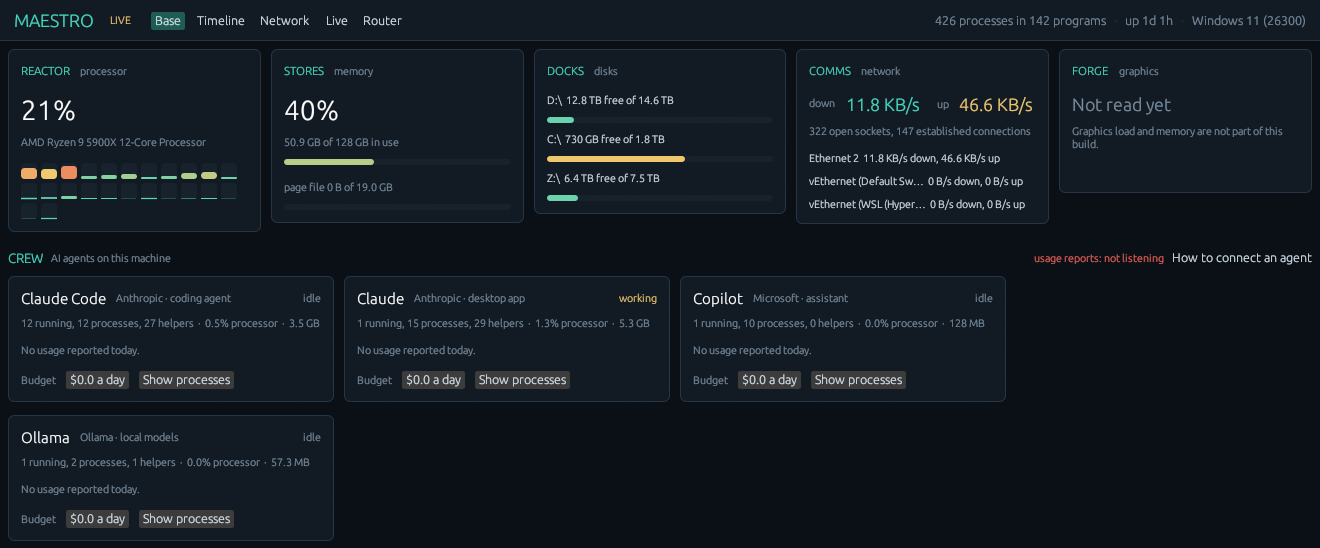
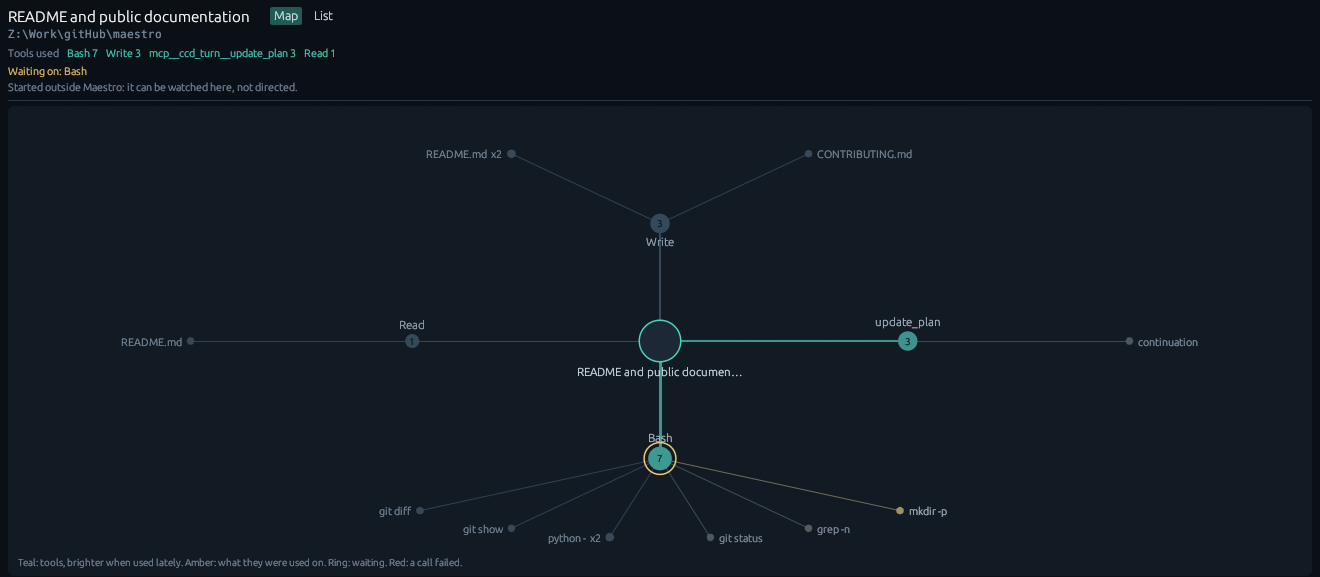
Processor, memory, disks, network and graphics every second, with the programs using the graphics card most. Every process grouped by program, with the file on disk behind it and what started it. Draw the same data four ways: tiles, a heat map, a tree of what started what, and a map.
Each process is sorted in plain words as critical to the system, part of the system, a background service or an app. A program that has touched neither processor nor disk for 15 minutes is counted as cold, and a critical system name running from outside the system folders is flagged, because that is a common disguise.
Tested Seen on screen on Windows with real data. The cold count has unit tests; the stale flags have not yet been seen on screen. Graphics is read on Windows, on one machine with one NVIDIA card so far.
FOCUS
Clear the machine for the task
Pick the program that matters. Maestro lists what could be paused and pauses nothing until you confirm. The task, what started it and what it started are always left running. Save the set as a profile and use it again with one click.
Paused programs lose nothing and resume where they stopped. Everything paused is written to disk first and resumed when Maestro closes, so nothing is ever left frozen.
Tested Pause, resume, end and the locks were run on Windows and Linux. The buttons have been seen but not yet clicked through by a person.
NETWORK
Who every program is talking to
Every connection sits under the program that opened it, with the name and owner behind each address, marked as this computer, your network or the internet. Every listening port is shown with whether other computers can reach it.
Tested Seen with real data on Windows. Blocking one program at the firewall is written and has not been run.
CREW
Your agents, recognised by themselves
Claude Code, Cursor, Codex, Copilot, Gemini CLI, Ollama and others are found among the running programs with no setup. The shells and scripts an agent starts are counted with it, so the processor and memory shown are what it is really using.
A tool that is installed with nothing running gets a card too, with a button to start a session or to set it up.
Tested Run on a machine with Claude Code, the Claude app, Copilot and Ollama. The rules for the other agents are untested.
SETUP
A tool that is installed but not ready gets a guide
When an agent tool is on the computer but cannot be used, a strip marked NOT SET UP runs across every page. Its guide lists every step in order, ticks the ones already done and gives the exact line to paste.
Maestro can run a step for you: it shows the fixed line, and on your yes runs it in a terminal you can see. Or an agent walks you through, one approved step at a time. Signing in is always finished by you. Maestro never types or sees a password.
Tested Used for real on Windows to install Cursor's command-line agent and sign in to it. The agent walk-through has unit tests and has not been used for real.
LEDGER
Honest accounting of cost and quota
Agents that report usage show their tokens and cost for today, 7 days and 30 days. Set a daily budget per agent. List your AI accounts and the advisor proposes the cheapest route for a task, with the cost of the handoff counted in.
Subscription figures are labelled as estimates, because vendors do not publish them exactly. Maestro says so instead of guessing.
Tested The receiver was tested with a sample report, not yet a real agent. The advisor has unit tests and was run from the command line.
CONTROL
Every action can be undone or asks first
An action log runs along the bottom of the window with an undo on everything that can be undone. Ending a program takes a second click. Processes the system needs are locked, from the window and the command line alike.
Tested The locks and resume-on-close were run against a throwaway process.
OPTIMIZE
One button for a second opinion on the whole machine
Optimize gathers a report on the machine: firmware, drivers, memory, drives, the power plan, what starts with the system, and the stale and heavy programs. You see the report before anything is sent. On your click, an agent you are signed in to, Claude Code or Cursor, reads it and lists what is worth changing, largest gain first, each with its risk, why and how.
It advises only: nothing on the machine is changed. The report holds no user name, computer name, serial number or file path. The agent reads it under written rules: never weaken security, no registry cleaners, driver-updaters or tweak scripts, firmware only from the maker's own page, and an empty list is a fair answer.
Tested The report was gathered for real on Windows, in about 15 seconds. Reading the agent's answer has unit tests. No analysis has been run by a real agent yet, and the page has not been seen on screen.